Pay Rent with Bilt Credit Card — Our Comprehensive Guide
Discover how to pay rent using the Bilt Mastercard® without incurring any fees, and learn how to earn valuable rewards with every rent payment. The existing Bilt Mastercard® was discontinued to new applicants as of November 5, 2025.

Photo: Pixabay
Important Update!!!
The existing Bilt Mastercard® was discontinued to new applicants as of November 5, 2025. Beginning February 6, 2026, all existing Wells Fargo Bilt Mastercard® accounts will be converted to the Wells Fargo Autograph Visa. Cardholders will also have an option to transition to the new Bilt 2.0 Card, issued by Bilt’s new banking partner, or to close their account at any time.
Bilt Card 2.0 — pre-order opened January 14, 2026
Read our review about the new Bilt 2.0 program.
Existing cardholders
On January 14, 2026, Bilt has revealed their new credit cards - Bilt Blue, Bilt Obsidian and Bilt Palladiaum - and opened the pre-order.
To ensure a smooth and seamless upgrade, choose your new card by January 30, 2026.
Upgrading your Bilt Mastercard to Bilt Card 2.0
Upon selecting your new Bilt Card 2.0, you will receive a seamless upgrade, including:
- keeping your same card number — all your major subscriptions, autopay, and saved payment methods stay the same
- auto-updates to your digital wallets — Apple Pay and Google Pay automatically refresh with your new Bilt Card details
- upgrade with no hard credit inquiry — choose from three new cards without a hard inquiry on your credit report
- card arrival by February 6, 2026 — your new Bilt Card 2.0 will be in hand by launch
If you do not wish to upgrade to Bilt Card 2.0
If you decide not to upgrade to Bilt Card 2.0, your current card will keep working until February 6, 2026. It will be deactivated on February 7 as part of the upgrade transition. You will receive a Wells Fargo Autograph® Card to continue accessing and managing your Wells Fargo credit card account. You can keep this account open or close it at any time by contacting Wells Fargo.
Choosing not to upgrade to Bilt Card 2.0 will not affect your points, status, or Bilt membership, all of which you retain with or without a Bilt Card.
Bilt Mastercard
Are your monthly rent payments consuming a significant part of your income, especially as housing costs continue to rise? What if I told you that your monthly rent payments could be your ticket to earning valuable rewards?
Yes, you read that right! Imagine paying your rent and receiving valuable rewards in return. You might think it’s too good to be true, but the Bilt Mastercard® makes it possible.
This groundbreaking credit card not only offers a host of impressive features but also lets you earn rewards for paying your rent, making it the first of its kind in the market.
In this article, we’ll walk you through a step-by-step process on how to use the Bilt Mastercard® to pay your rent without any transaction fees and how to earn rewards every time you make a rent payment.
Joining Bilt Rewards and Earning Points
Bilt Rewards is a loyalty program that lets you earn points on rent payments, whether you live in a Bilt Rewards Alliance property or not. Here’s how you can become a member and start earning:
- For Bilt Rewards Alliance Members (In-Network): If you rent from a Bilt Rewards Alliance property, you can start earning points immediately by enrolling in the loyalty program. By paying your rent through the Bilt Rewards app, you’ll earn a consistent 250 points each month. You just need to connect your unit to Bilt Rewards and set up rent payments. To boost your earnings to one point per dollar, get the Bilt Mastercard®.
- For Non-Bilt Rewards Alliance Members (Out-of-Network): If your property is not part of the Bilt Rewards Alliance, you can still earn points on your rent payments if you get the Bilt Mastercard®. You’ll accumulate one point per dollar spent on rent each month.
Build Your Credit History by Paying Rent
Renting at a Bilt Rewards Alliance property allows you to have your monthly rent payments automatically reported to major credit bureaus. This can help build your credit history with each on-time rent payment, potentially boosting your credit score.
To learn more about the importance of a good credit score, check our article: What is a credit score?
Earning Points with the Bilt Mastercard®
The Bilt Mastercard® lets you earn points on your regular expenses, even on rent payments:
- 3X Points on Dining
- 2X Points on Travel
- 1X Points on All Other Purchases
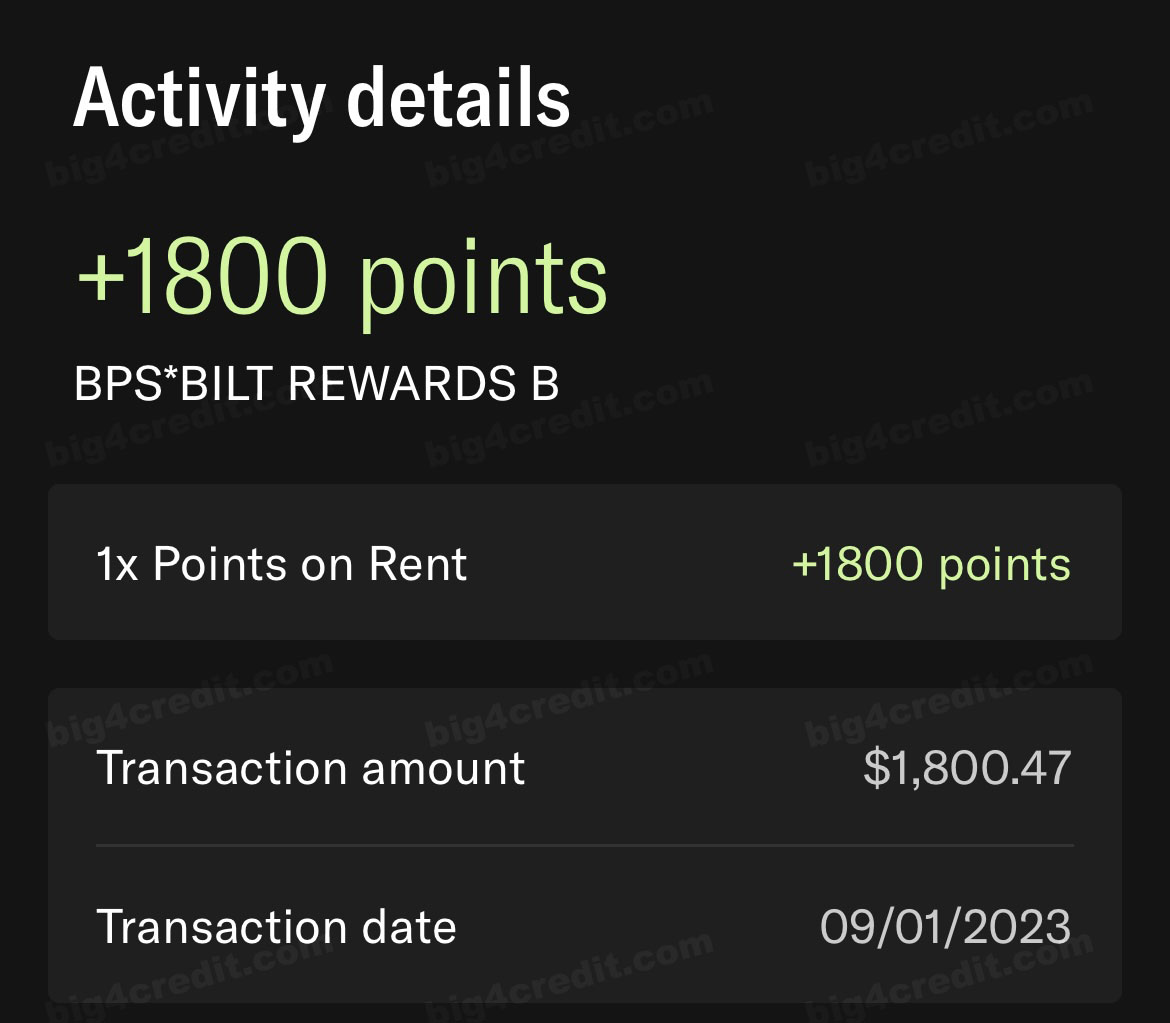
- 1X Points on Rent Payments - No Transaction Fees!
Screenshot of Bilt app
Earn up to 100,000 points per year on rent. Payments under $250 earn a flat 250 points.
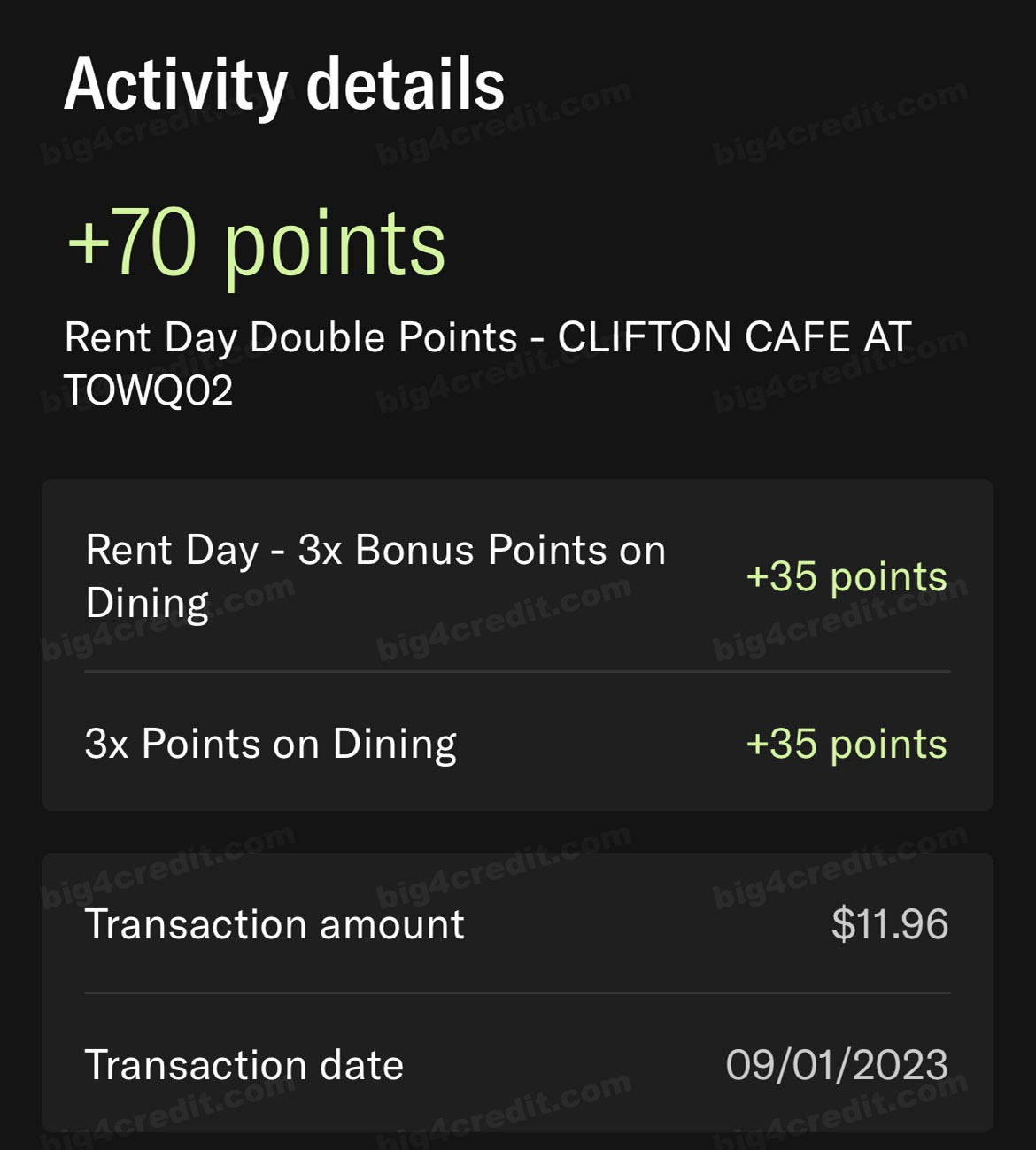
Bonus: Double Points on Rent Day (1st of Every Month)
Screenshot of Bilt app
- 6X Points on Dining
- 4X Points on Travel
- 2X Points on All Other Purchases (excluding rent).
Earning 1x points for rent payments can yield significant rewards, especially considering the rising cost of rent these days. For example, if you pay $1,800 in monthly rent, you’ll earn 1,800 points monthly, totaling 21,600 points a year.
$1,800 monthly rent = 1,800 Points every month.
1,800 Points x 12 months = 21,600 Points in a year just for paying your rent.
Important: To keep earning points, ensure you complete at least five card transactions in each statement period.
Paying Rent with the Bilt Mastercard®: Step-by-Step Guide
Credit cards offer convenience for rent payments, but not all landlords or property management companies accept them. When they do, there are often associated fees. So, how can you use your Bilt Mastercard® for rent, even when your landlord doesn’t accept credit cards, and how can you avoid transaction fees? Let’s walk through this guide step-by-step.
You can pay your rent and earn points using the Bilt Mastercard, and the best part is that there are no transaction fees. Even if your apartment isn’t part of the Bilt Rewards Alliance, you can still use your Bilt Mastercard to pay rent and earn points without fees, as long as your landlord accepts online payments or checks.
Paying Rent Online
You can pay rent online using your Bilt Mastercard® through an existing portal or to any landlord who accepts ACH payments. Bilt also supports rent payments via Venmo and PayPal. Although Zelle and direct bank transfers are not currently supported, they will be available soon.
Starting April 29, 2025, Bilt is upgrading its rent payment system to BillPay by Bilt, which provides enhanced security, flexibility, and new features, particularly beneficial for members renting from non-partner properties.
Important:
- Your current Bilt Rent Rewards account will expire on April 29, 2025.
- To continue earning points, you must switch to BillPay by Bilt through your Bilt Rewards account.
- Your existing rewards points will remain safe and unaffected.
You can easily set up BillPay by Bilt through the Bilt Rewards app or website. The new system requires pre-authorization of rent payments up to five days before making a payment. Before submitting your rent through your property’s portal, you must first authorize the total payment amount in your Bilt account. Be sure to include any additional charges, such as utilities, to ensure your payment processes successfully.
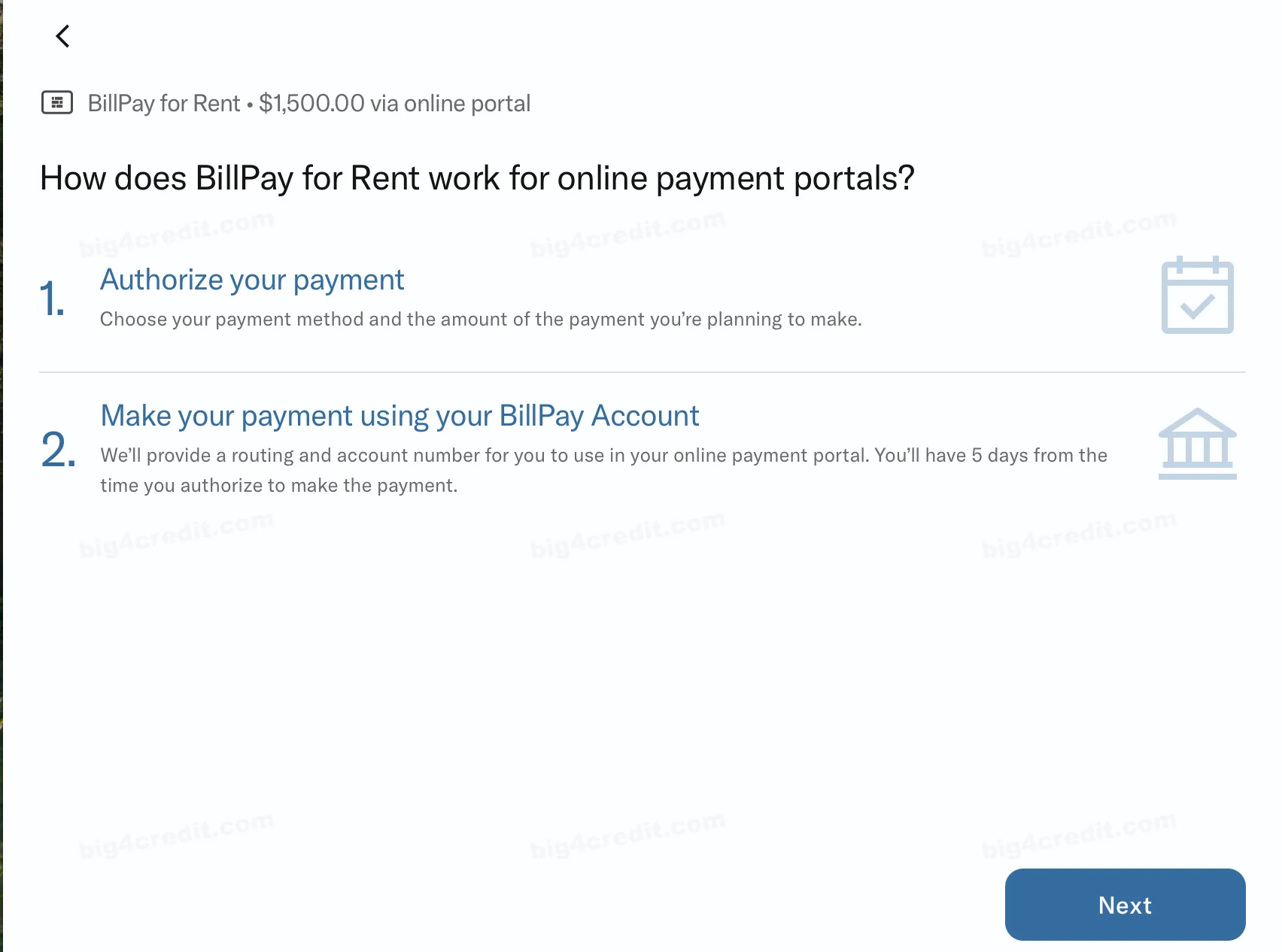
Here’s a step-by-step guide for setting up BillPay by Bilt:
Open the Bilt Rewards app
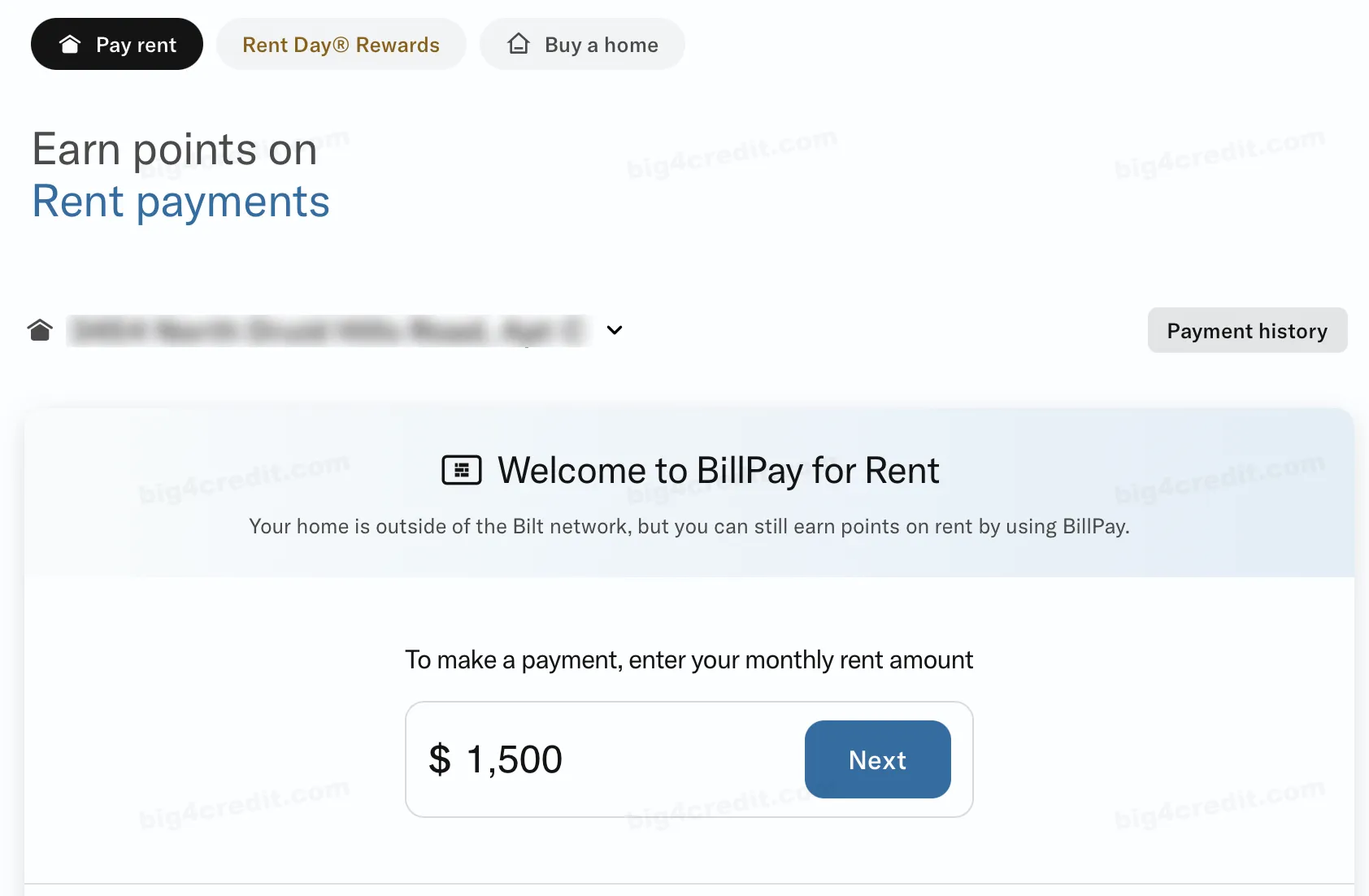
Go to the “Pay Rent” tab and select “BillPay for Rent.”
Enter your total rent amount (including any extra charges like utilities).
For your convenience, Bilt allows payments up to 110% of your authorized amount to accommodate small differences between the amount you authorize and the final payment.
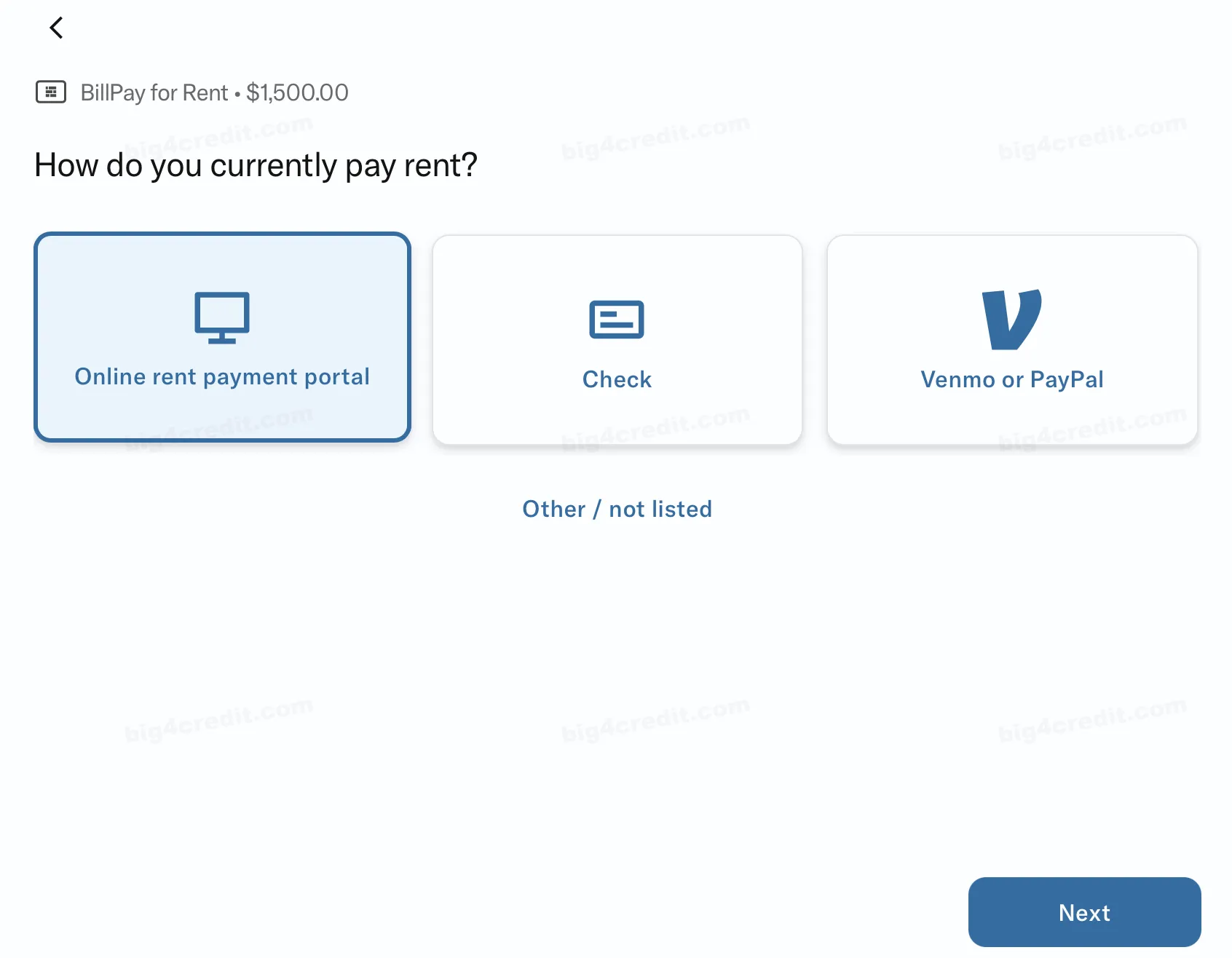
Select your rent payment method
Choose your preferred payment type:
- Online residential portal
- Physical check
- Venmo or PayPal.
Choose your card for payment
Bilt Mastercard®: No transaction fees and earn valuable Bilt Points.
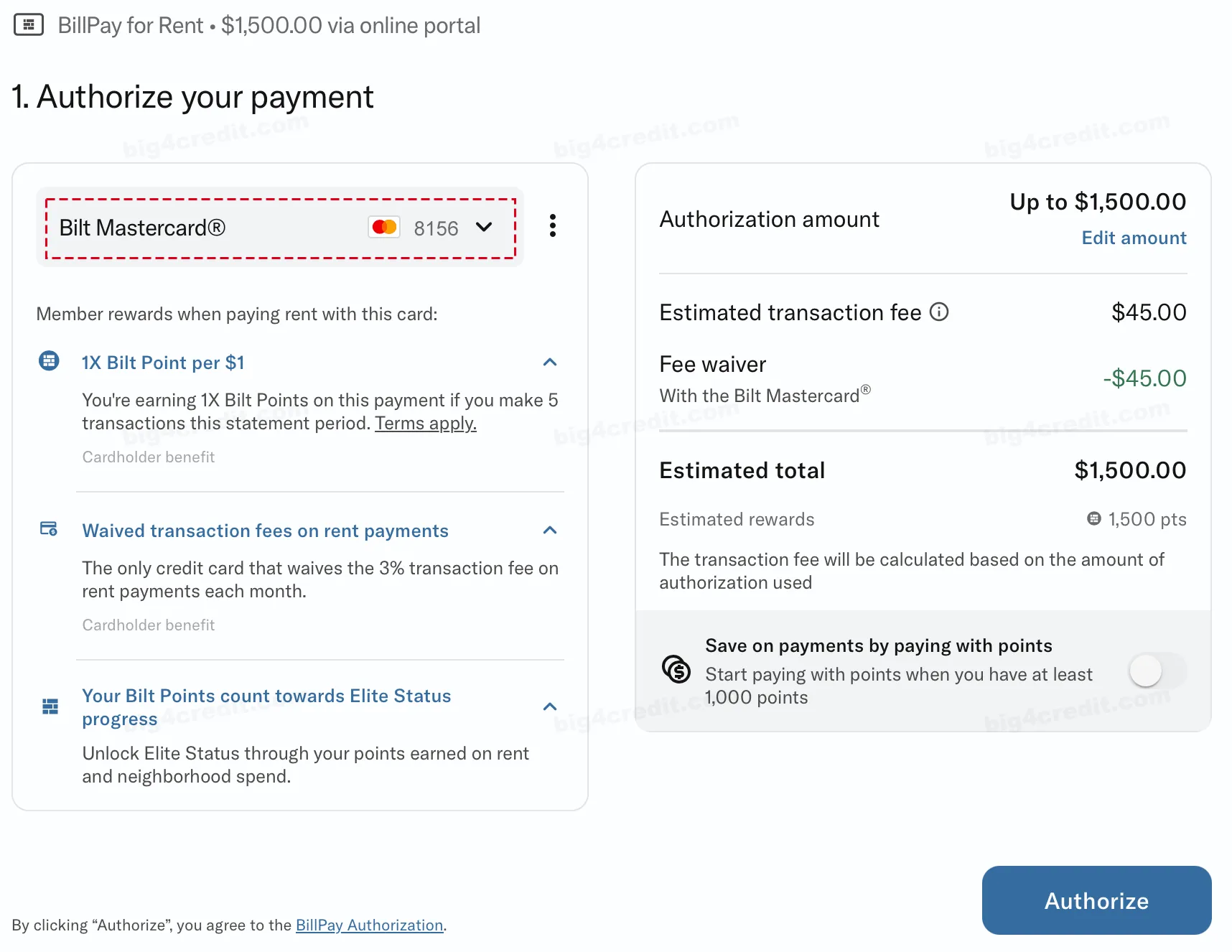
Other credit or debit card: Earn Bilt Points in addition to your regular card rewards, but transaction fees will apply.
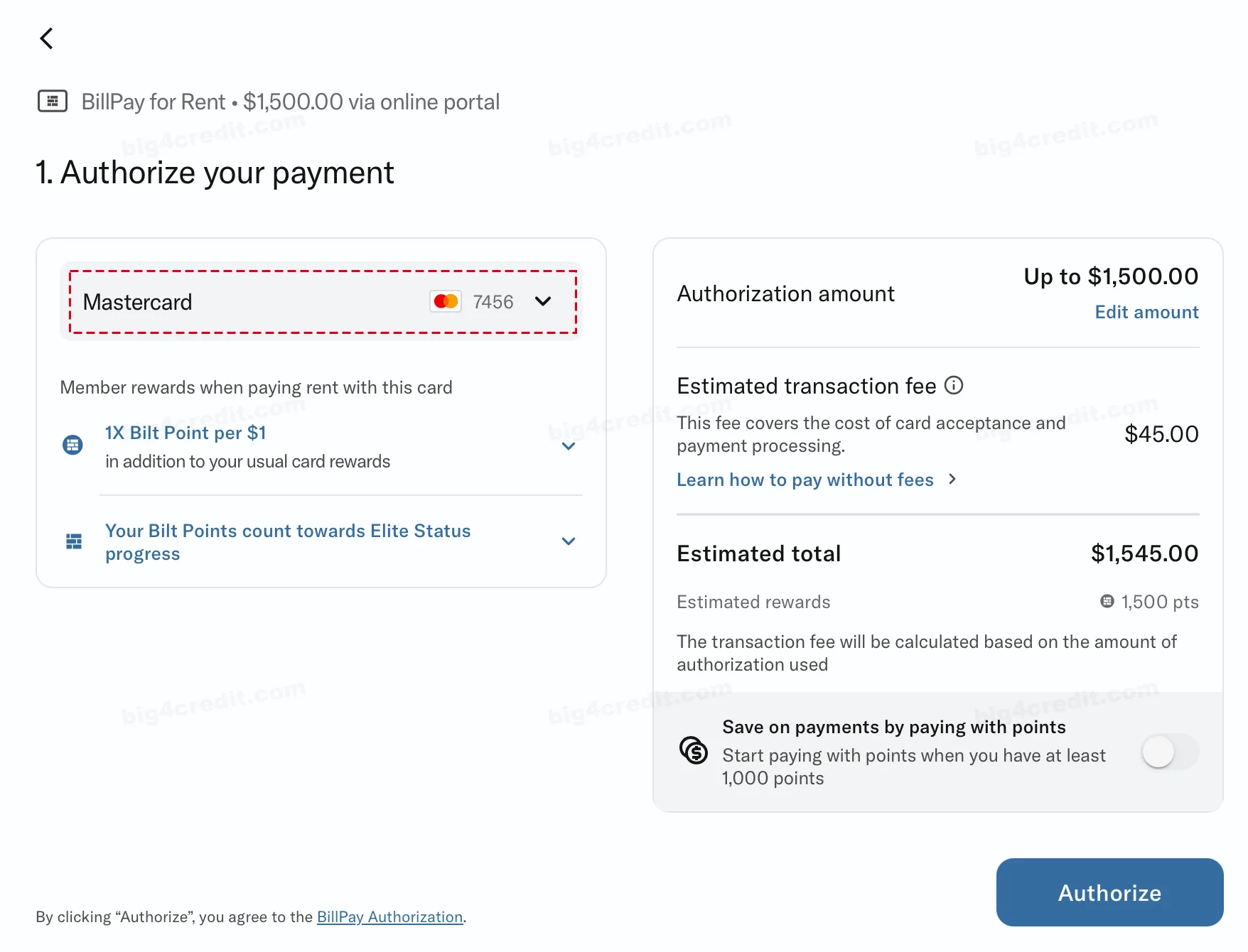
Authorize your payment
- Confirm and authorize your payment details.
- Bilt will generate unique BillPay routing and account numbers for your rent payment.
- Once authorized, you have five days to submit the payment through your property’s portal.
Important: Payments submitted without prior authorization through Bilt will be blocked, and you’ll receive an email explaining the reason.
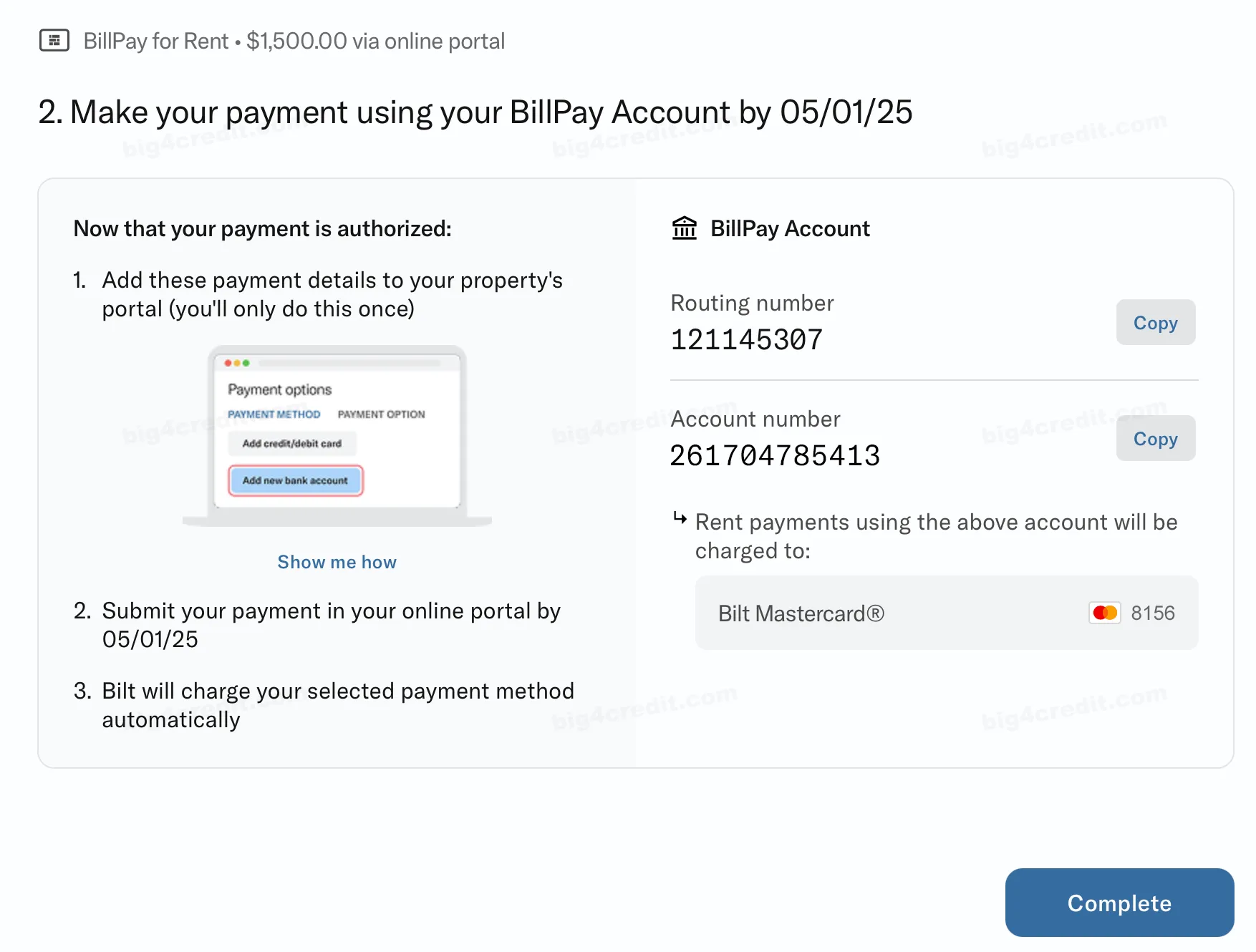
Add Bilt Mastercard as a payment method to your online rent payment portal:
- Log in to your residential portal and navigate to “Select a Payment Method”.
- Click “Add Payment Account” and select “E-Check” or “ACH” as the payment type. DO NOT select “Credit Card” to avoid fees.
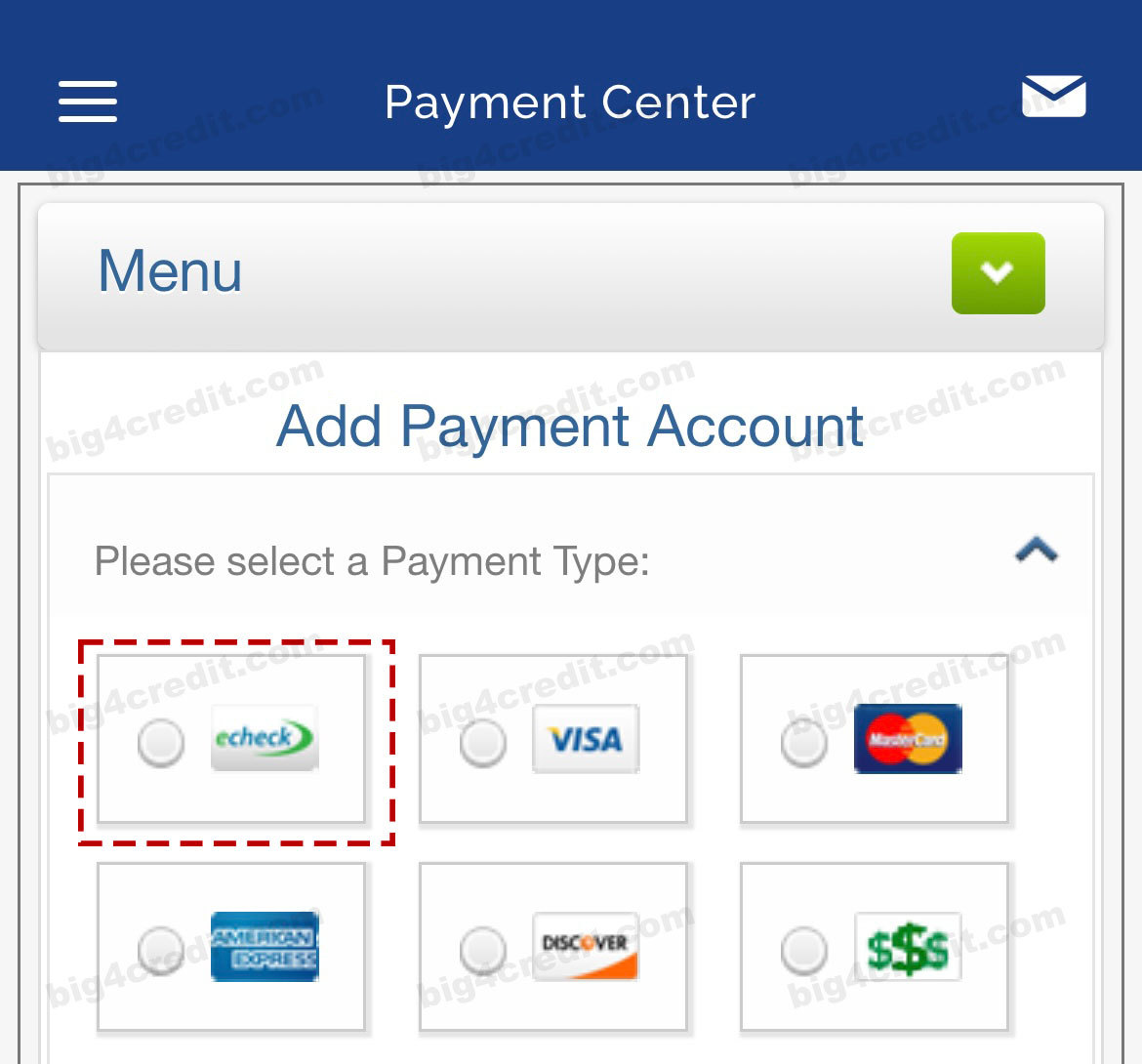
Screenshot of a property's residential online portal
Please note that if you select the credit card option here, you will be charged a transaction fee for paying rent with a credit card. To avoid transaction fees, ensure to select “E-Check” or “ACH” as a payment type. - Enter the routing and account numbers provided by Bilt.
- You only need to complete this step once.
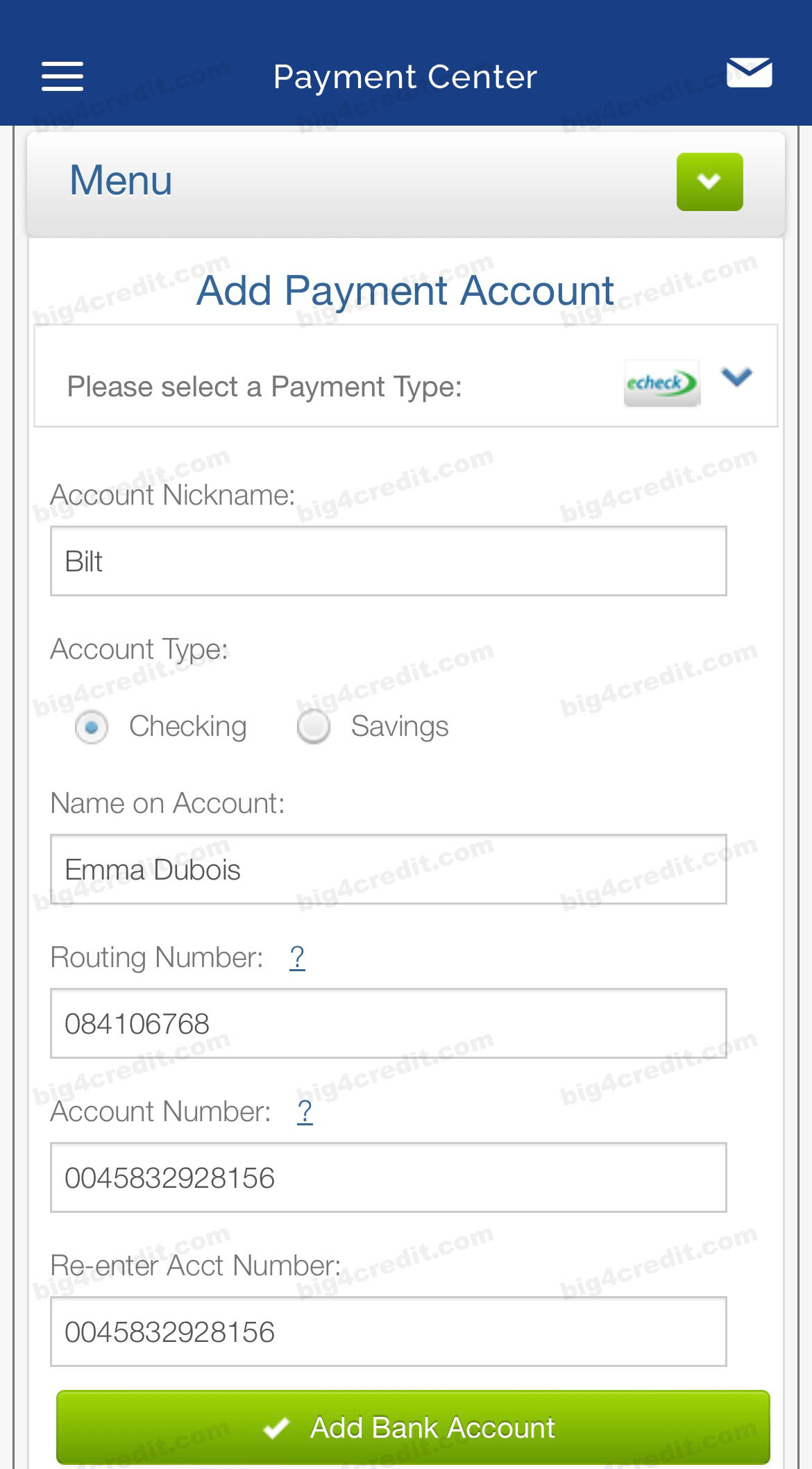
Screenshot of a property's residential online portal
- To find your specific routing and account numbers, go to “Pay Rent” → “View payment instructions” in your Bilt Rewards app or website.
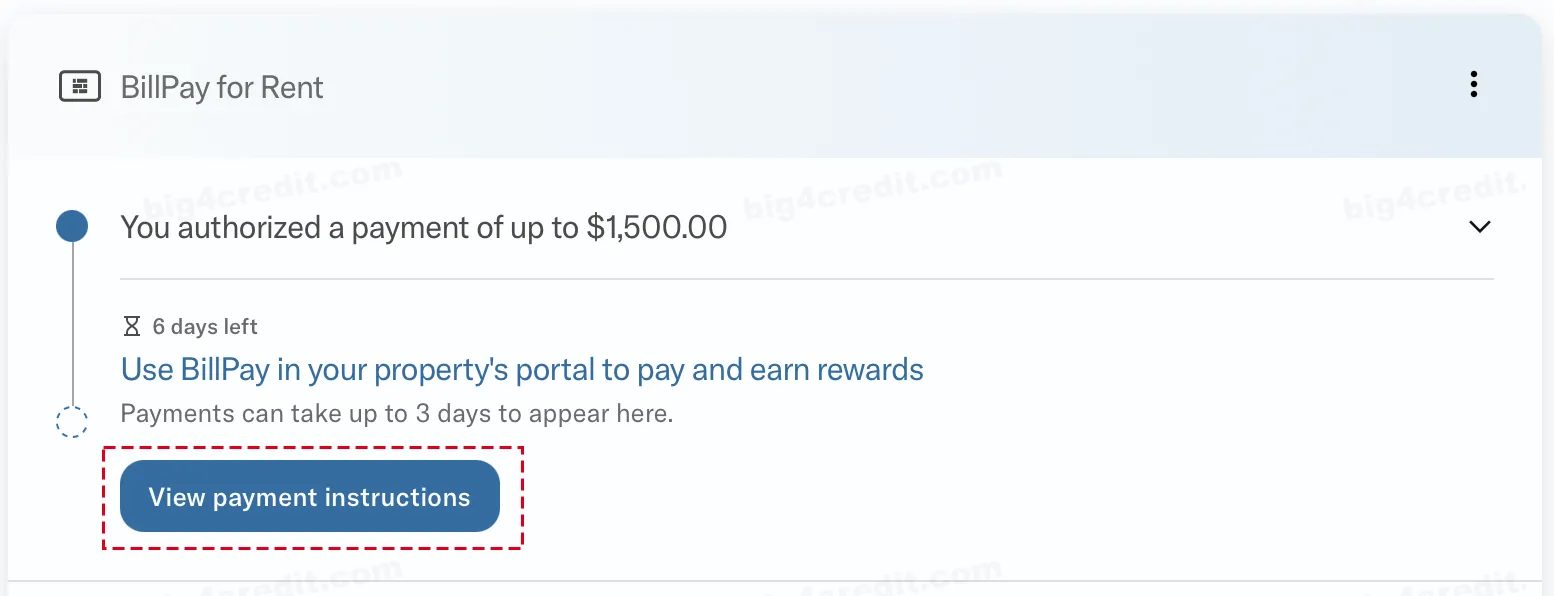
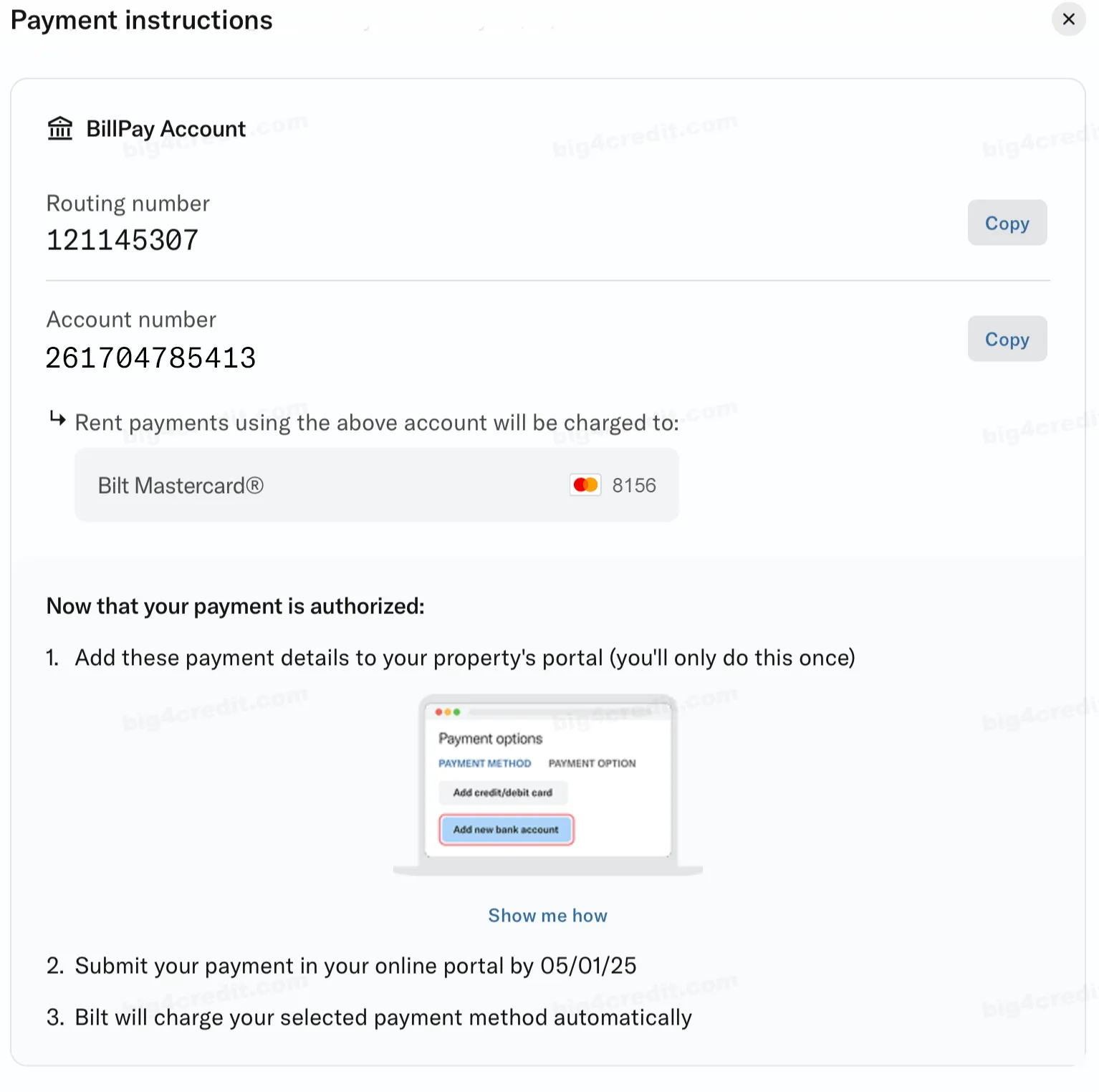
Submit your rent payment:
- After setup, submit your rent payment through your landlord’s online portal as usual.
- Bilt takes care of charging your selected card and securely delivering the payment to your landlord.
- You’ll earn rewards on every rent payments!
Important: Submit your rent payment within five days of authorizing it in the Bilt app.
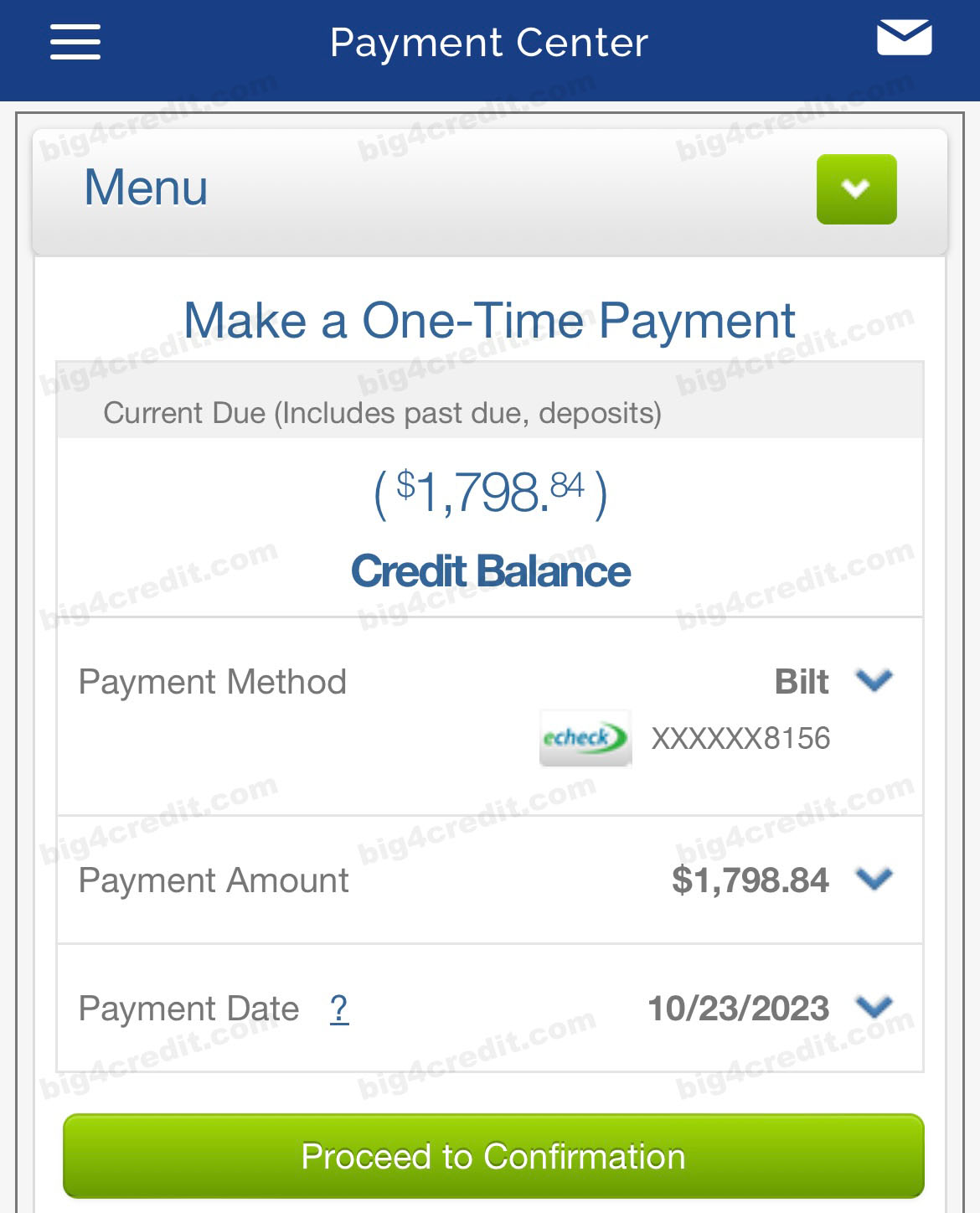
Screenshot of a property's residential online portal
Please follow Bilt guidelines closely to avoid fees. Incorrect setup may result in blocked payments or extra charges.
Paying Rent by Physical Check
If your property only accepts physical checks, you can still use your Bilt Mastercard and earn rewards:
- Go to “Pay Rent” → “BillPay for Rent” → Select “Check” in the Bilt Rewards App. Note: Check payments are only available through the Bilt app.
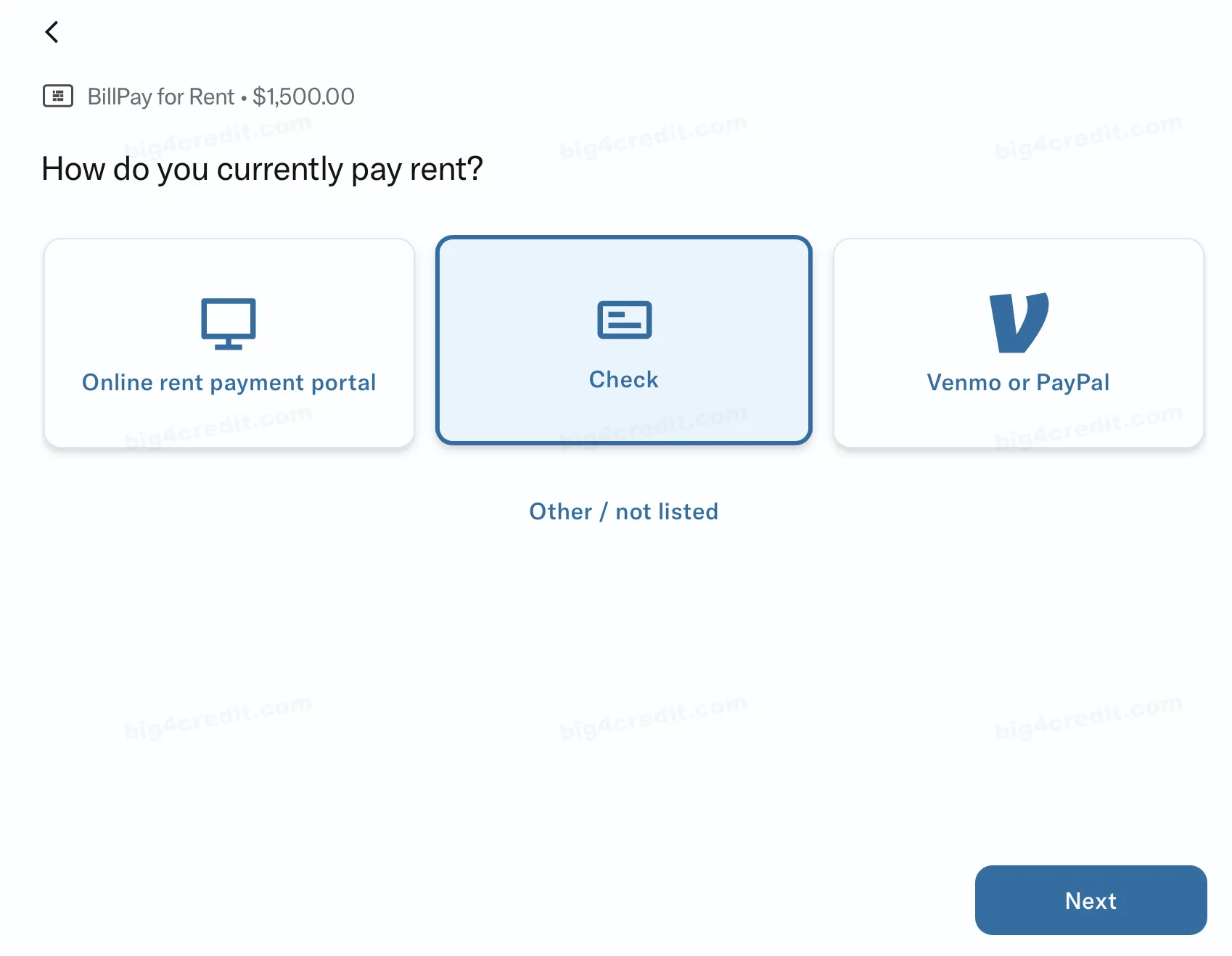
Set up check payments details:
Specify the payee for the check.
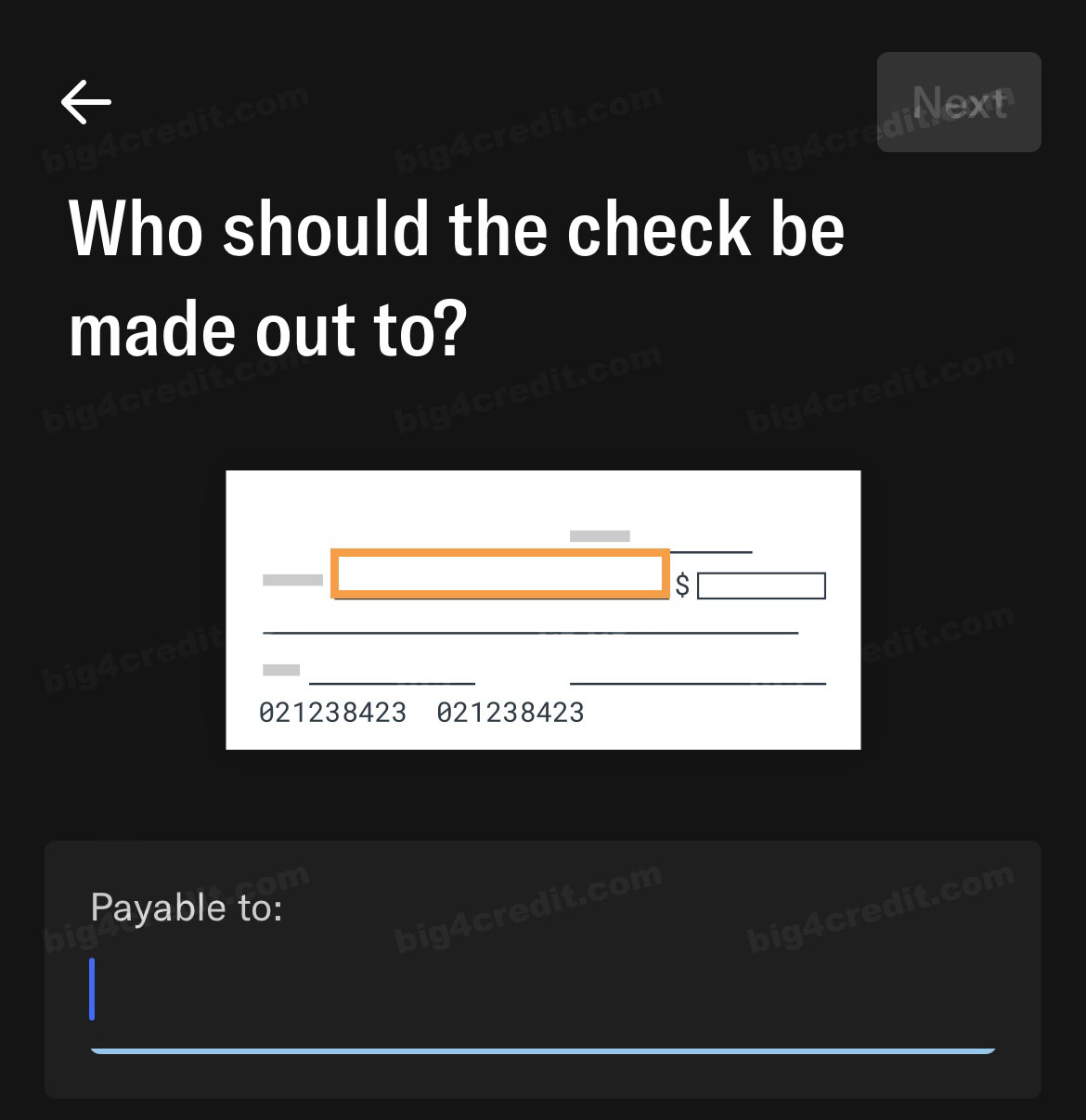
Screenshot of Bilt app
(Optional) Include a message.
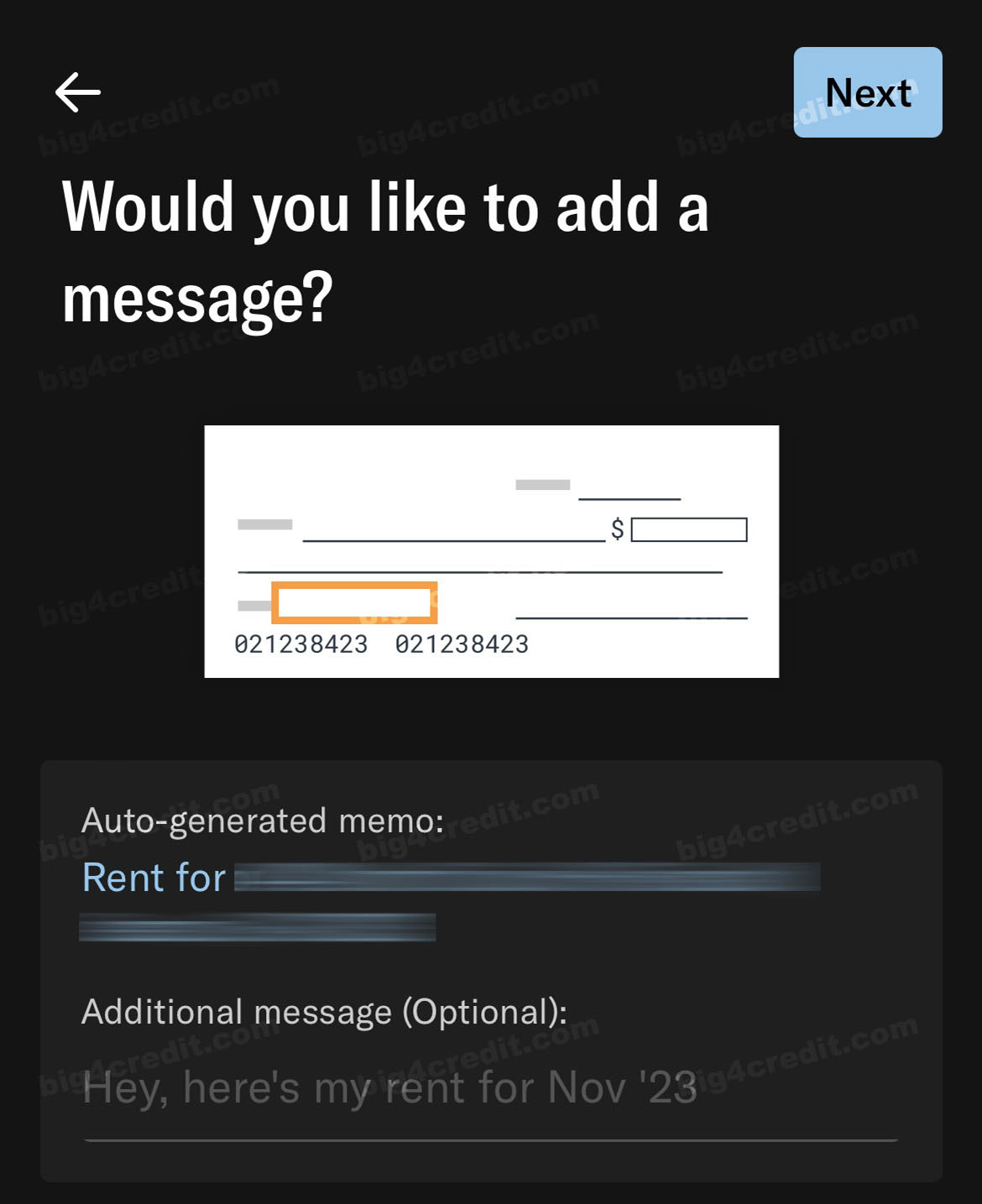
Screenshot of Bilt app
Provide the mailing address for sending the check.
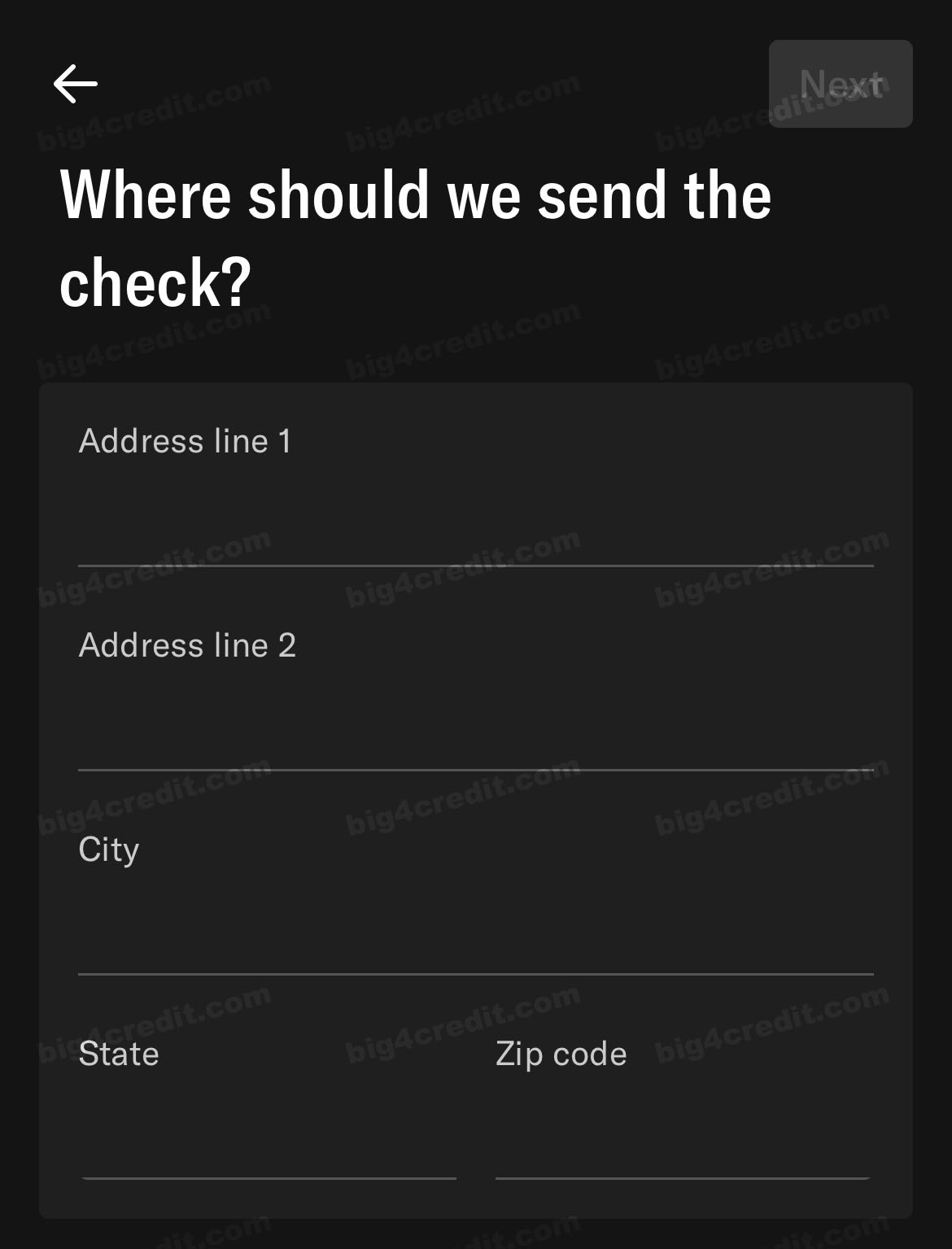
Screenshot of Bilt app
Double-check all information for accuracy.
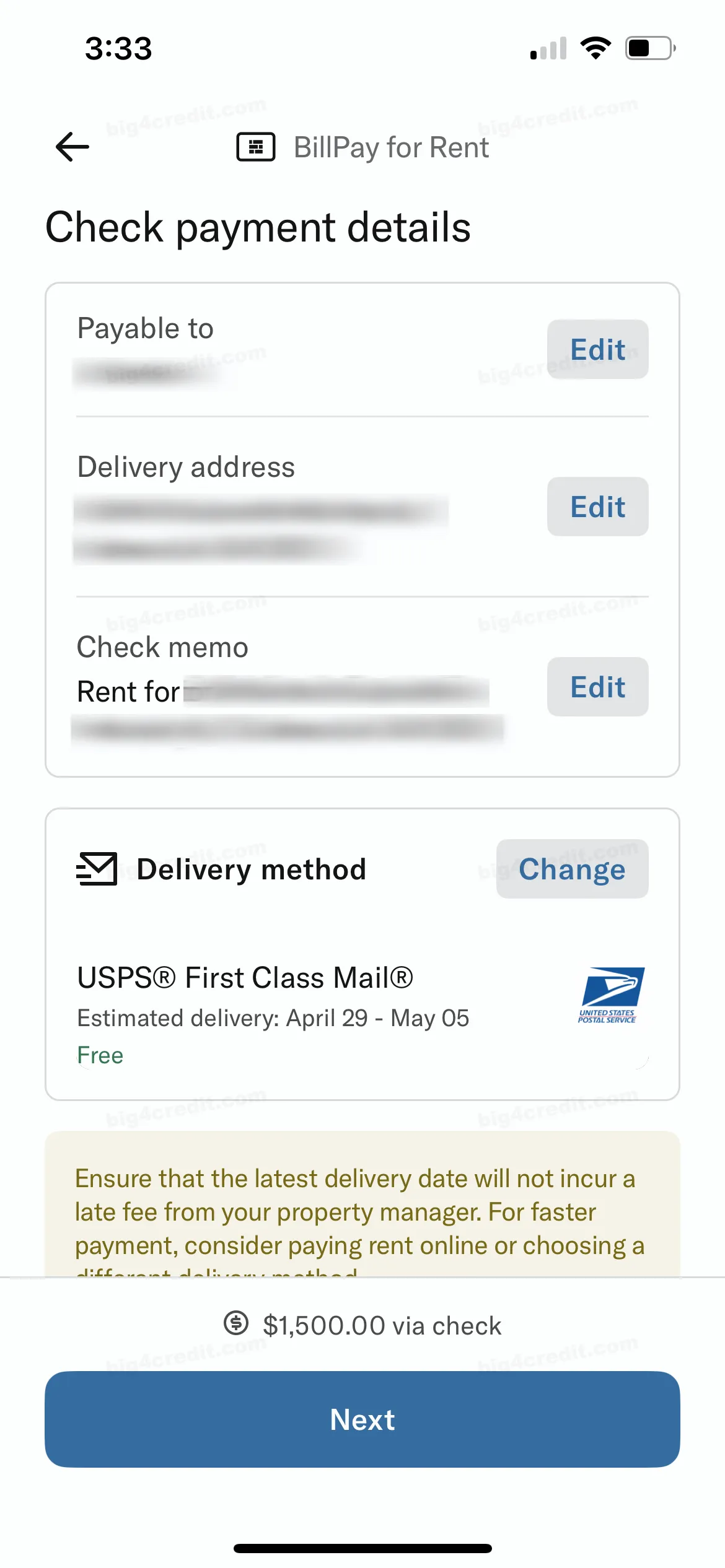
Screenshot of Bilt app
Submit your payment:
- Bilt will charge your Mastercard and send a paper check to your landlord via USPS First Class mail (allow 5-7 business days for delivery).
Setting Up Auto-Authorization for Online Rent Payments
For even more convenience, consider setting up auto-authorization:
Log in to your Bilt Rewards account and navigate to ‘‘Rent Payment Settings’’.
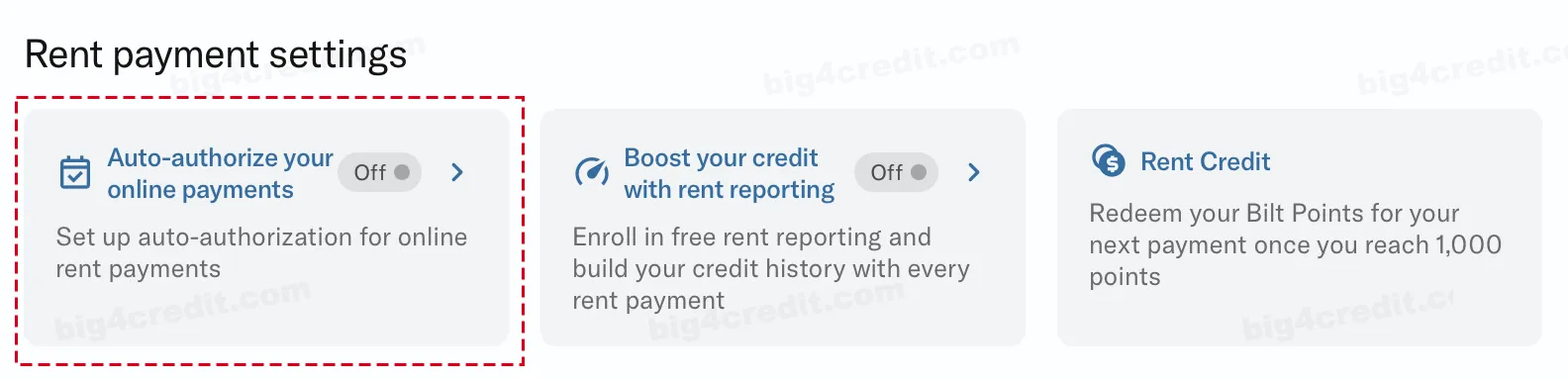
Select “Auto-authorize your online payments” to begin setup.
Choose your payment method.
Select an authorization date:
- Payments will be automatically authorized on this date each month.
- Authorization remains valid for five days for rent payment submission through your property online portal.
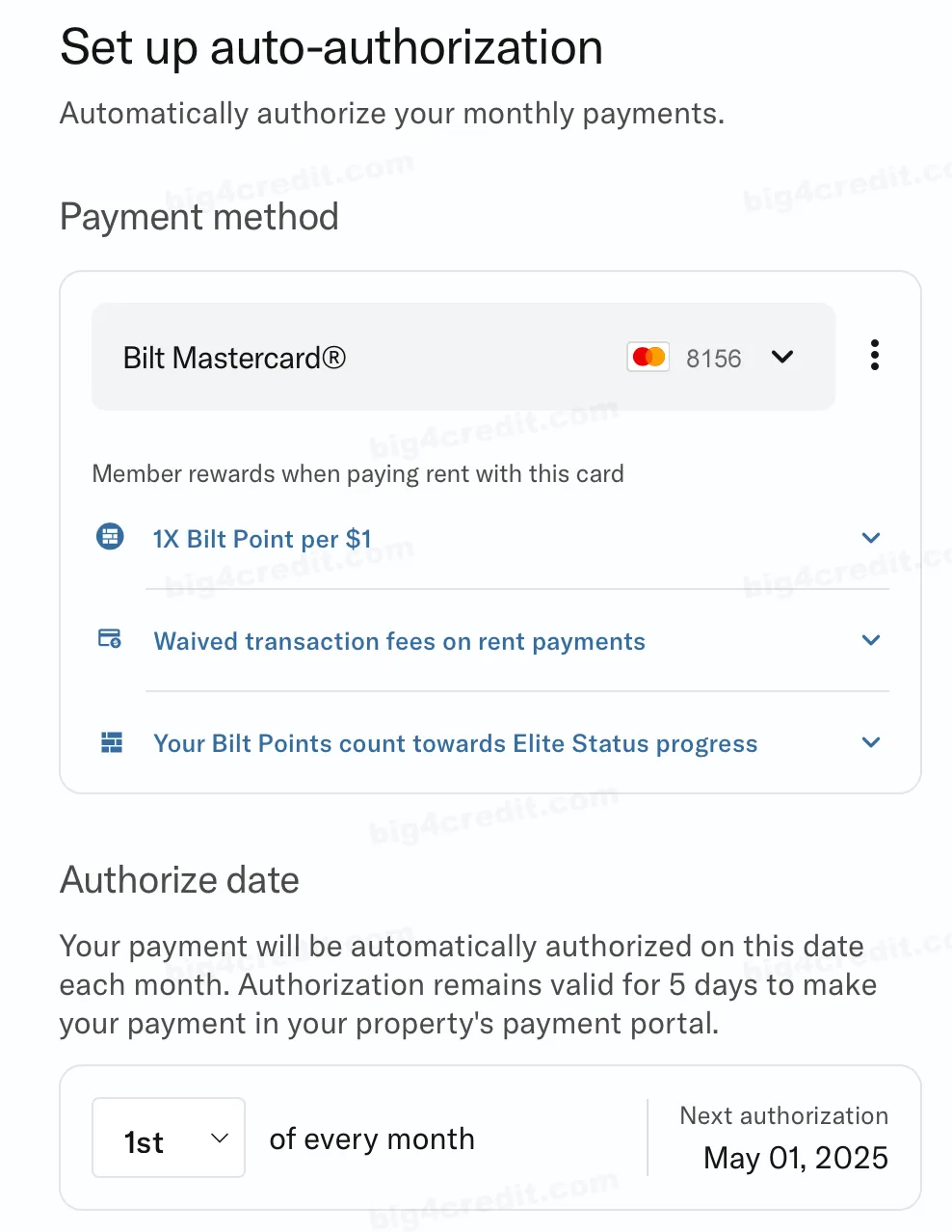
Screenshot of Bilt app
Enter your estimated authorization amount:
- Bilt allows flexibility for small differences between your authorized and actual payment amounts.
Click “Complete Setup”
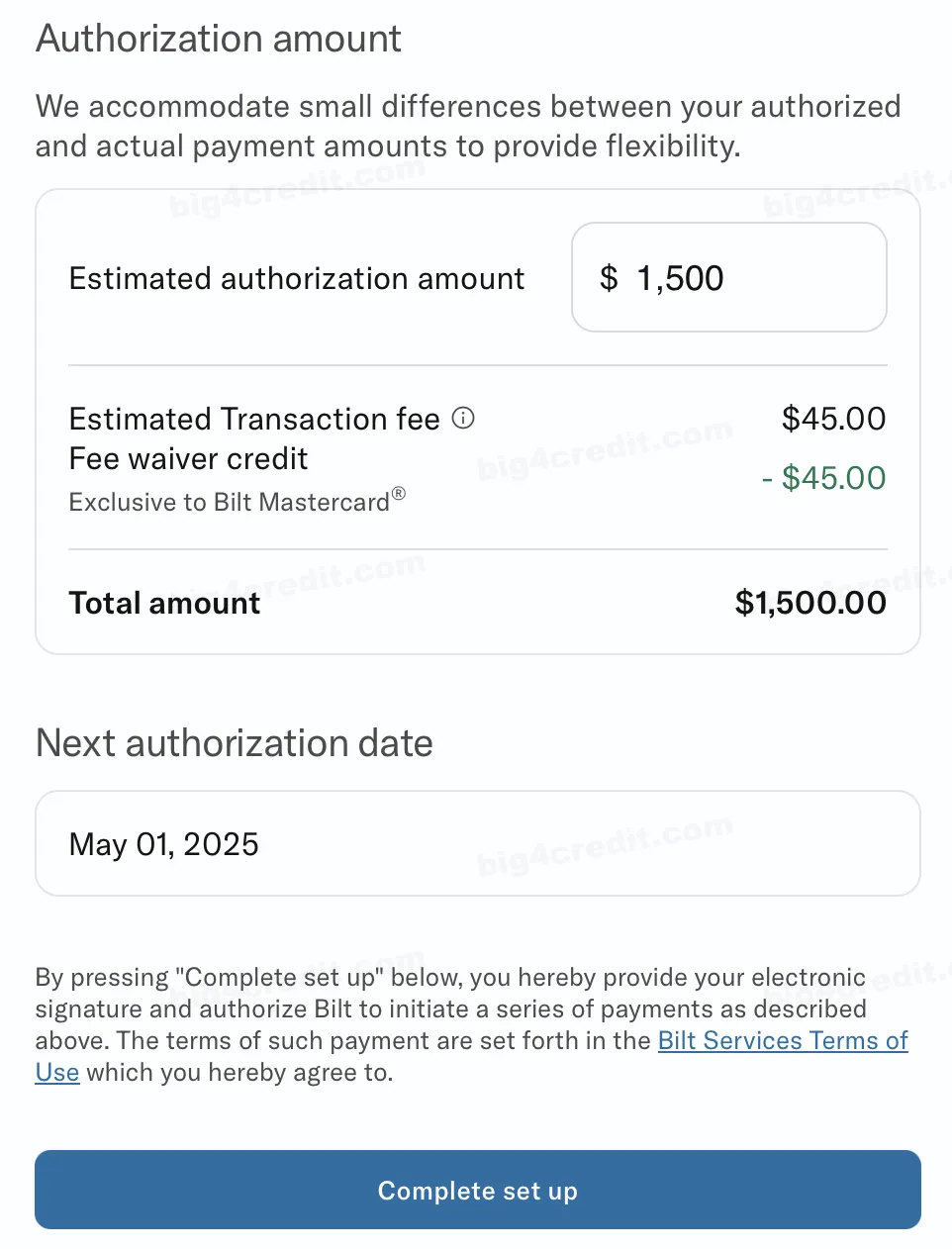
Screenshot of Bilt app
BiltProtect Debit™
BiltProtect Debit™ is a smart feature that let you pay rent with Bilt Mastercard® without impacting your available credit. Once activated, Bilt will instantly withdraw the rent amount directly from your linked bank account as you make your rent payment. This ensures that a significant portion of your credit line remains accessible for all your other financial needs. You can comfortably pay your rent without concerns about maxing out your credit limit and still earn points for your monthly rent payments.
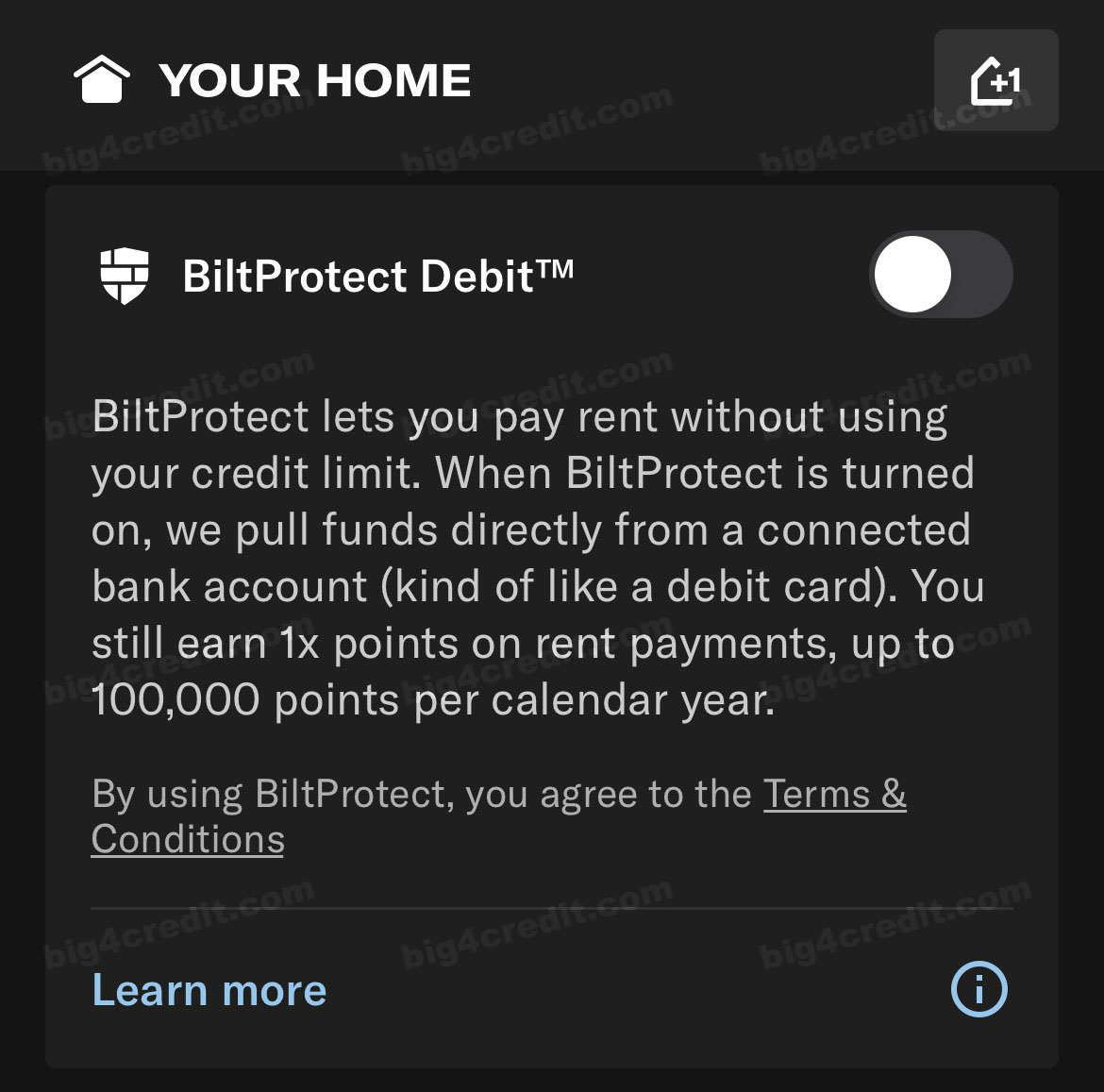
Screenshot of Bilt app
Moreover, BiltProtect offers the flexibility to cover rent amounts that exceed your available credit by withdrawing the full payment directly from your linked bank account when you initiate the payment. It’s a convenient and credit-friendly approach to managing your rent expenses.
To enable BiltProtect:
Go to the “Pay Rent” tab.
Under “BillPay for Rent,” click Edit.
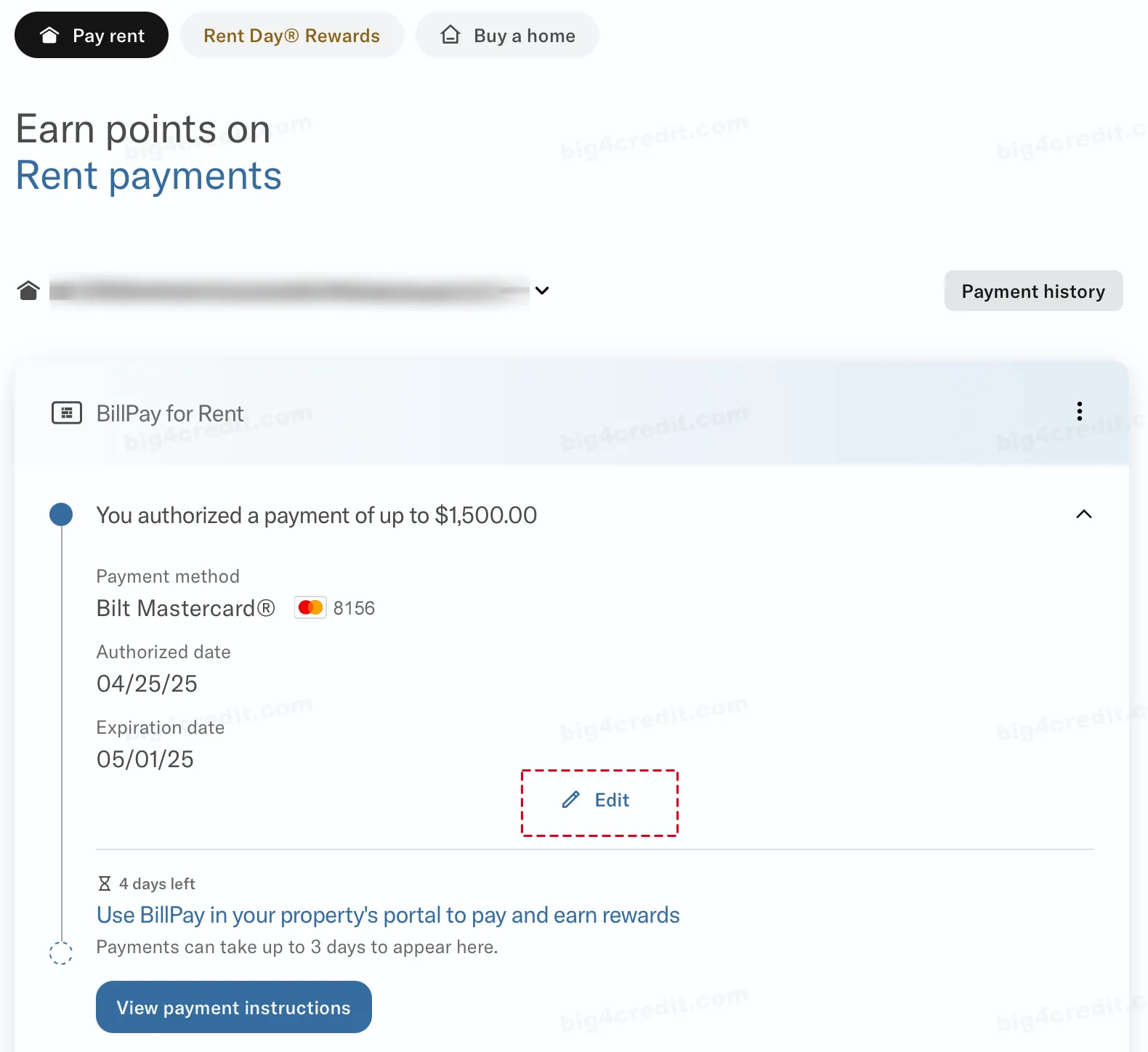
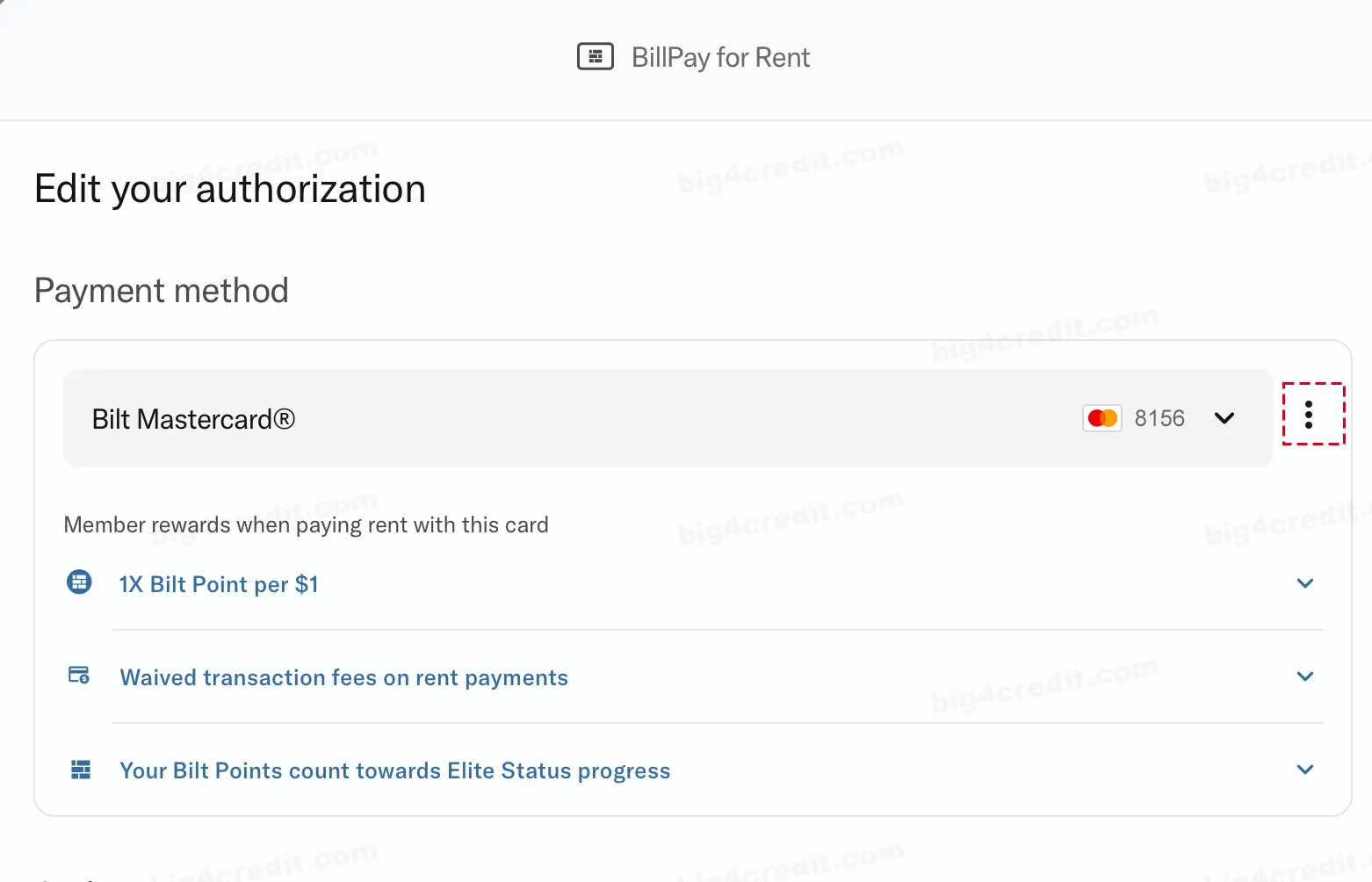
Select Bilt Mastercard as your payment method, then tap the ellipsis [⋮] to turn the BiltProtect Debit toggle On.
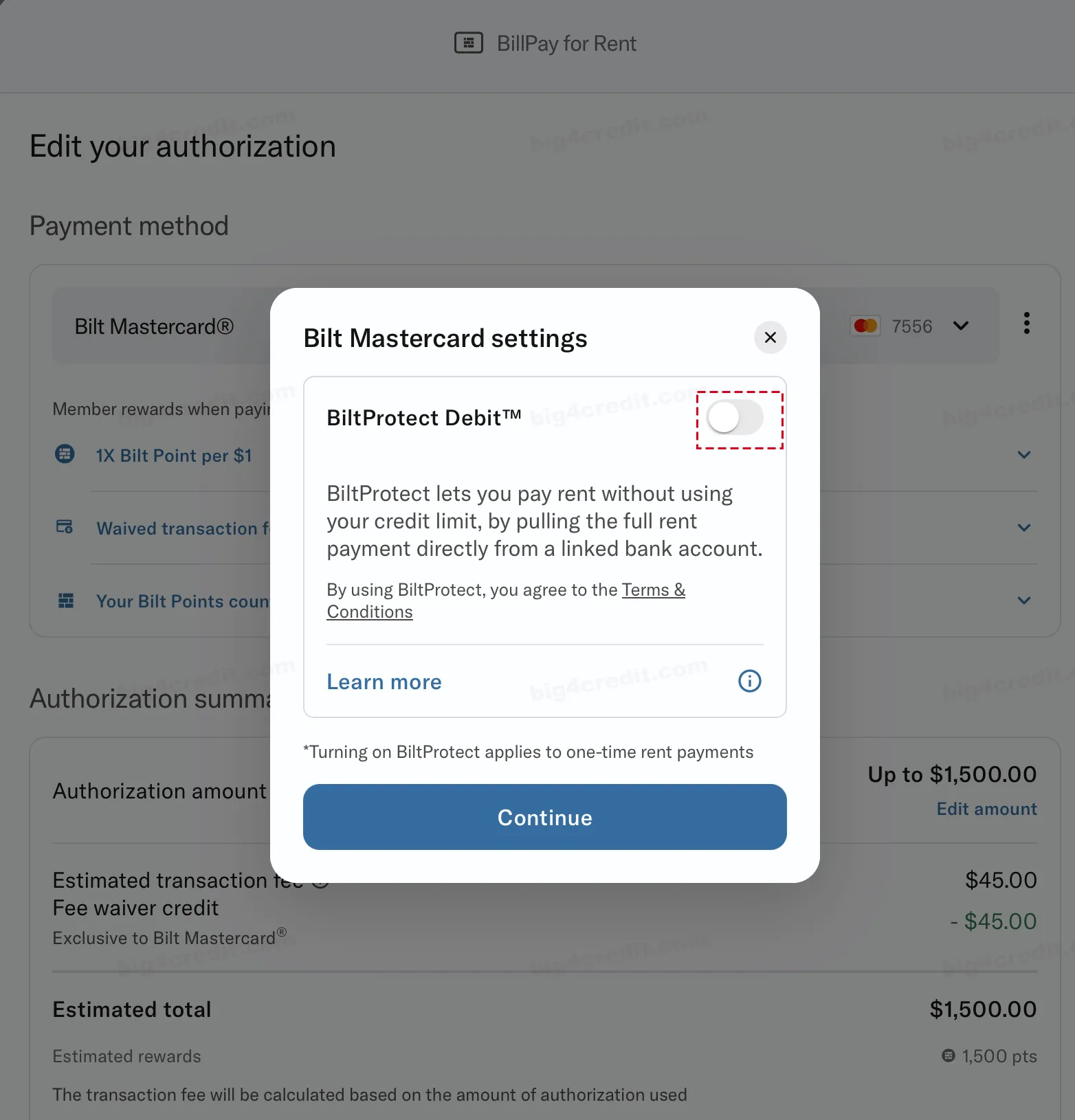
You’ll know BiltProtect is enabled when the toggle turns green. To disable BiltProtect, simply tap again, it will turn gray.
Redeeming Points for Rent Payments
Bilt lets you effortlessly lower your monthly rent expenses by using Bilt Points to cover a portion or even the entire rent. Bilt points can also be redeemed for travel, shopping at Amazon.com, stylish home décor, fitness, towards a down payment for a home purchase, and more.
Conclusion
With the Bilt Mastercard®, you can earn valuable rewards by paying your rent, making it a credit card like no other. Start enjoying the benefits today!
The information about the Bilt Mastercard® has been collected independently by big4credit.com. The card details have not been reviewed or approved by the card issuer.